Thứ Hai, 13 tháng 5, 2013

Working with Article Categories in Joomla 2.5


What is a Joomla Category?
When you write an article in Joomla 2.5, you assign it to a category. You can think of a category just like a folder. Assigning articles to categories helps not only to categorize and keep track of articles, but it also helps your website visitors find similar content based upon the category of the article they're reading. This is a standard thing to do when writing an article.
Can I have Categories of Categories (Sub Categories)?
Previous versions of Joomla (ending with Joomla 1.5) used a section / category structure. What this meant was that every article belonged to a category, and every category belonged to a section. This was somewhat limiting as it would not allow for deeper categorization of content. For example, you could not have subcategories of categories. It also required that you have both a section and a category, when sometimes only a category would be needed. Newer versions of Joomla don't use the section / category structure any longer. Instead, only categories are used now, and you have the ability to created sub categories of categories if needed.
To create a new category in Joomla 2.5:
  1. Log into your Joomla Dashboard
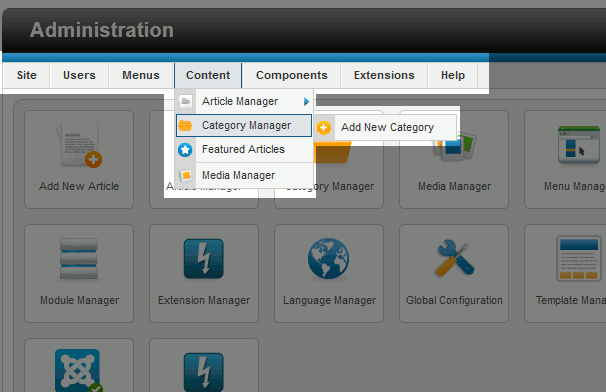
  2. Under the Content menu, hover over Category Manager and then click Add New Category
    click-add-new-category
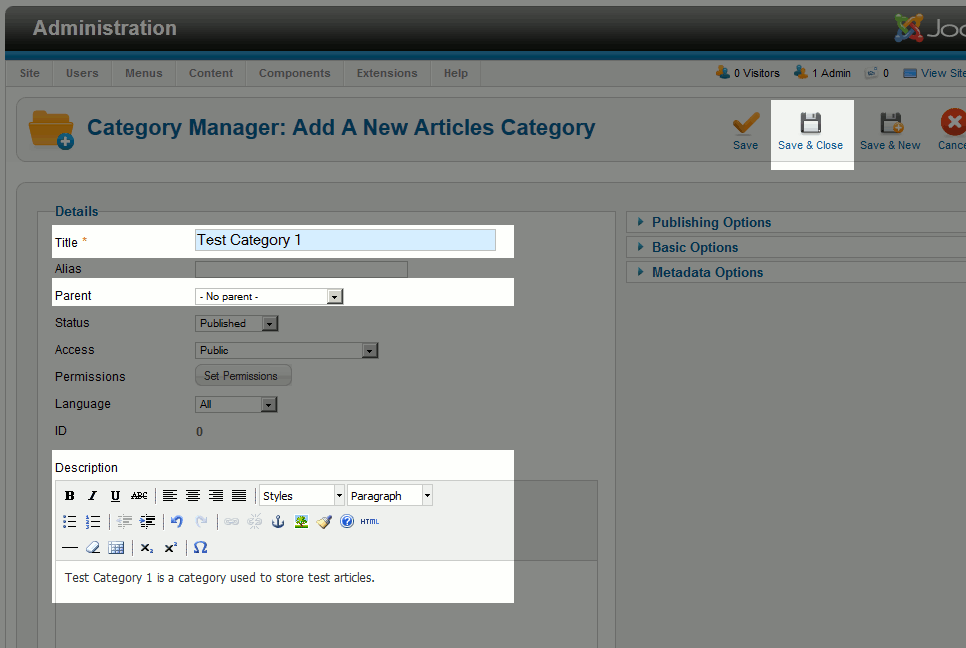
  3. Type in a Title for this category
    enter-the-details-of-your-new-category
    (this screenshot applys to the steps below as well)
  4. Choose a Parent Category.
    Is this a Parent Category?
    If you would like this category to be a main category (one that is not a sub category of any other category), choose - No Parent -
    Is this a Sub Category?
    If you would like this category to be a sub category of another category, then choose the parent category.
  5. Type in a Description for the category (this is an optional step). This description will show when someone visits the category page (a page that will list all of the articles belonging to the category).
  6. Click Save & Close. You have just created a new category in Joomla 2.5!
Adding a category to Joomla does not automatically add the category to any menus on your site. If you wanted to link to this category from a Joomla 2.5 menu, you will need to add a new category menu item to the menu of your choice.
In our next article, we will show you how to add images to your Joomla 2.5 articles.

Working with Article Categories in Joomla 2.5


What is a Joomla Category?
When you write an article in Joomla 2.5, you assign it to a category. You can think of a category just like a folder. Assigning articles to categories helps not only to categorize and keep track of articles, but it also helps your website visitors find similar content based upon the category of the article they're reading. This is a standard thing to do when writing an article.
Can I have Categories of Categories (Sub Categories)?
Previous versions of Joomla (ending with Joomla 1.5) used a section / category structure. What this meant was that every article belonged to a category, and every category belonged to a section. This was somewhat limiting as it would not allow for deeper categorization of content. For example, you could not have subcategories of categories. It also required that you have both a section and a category, when sometimes only a category would be needed. Newer versions of Joomla don't use the section / category structure any longer. Instead, only categories are used now, and you have the ability to created sub categories of categories if needed.
To create a new category in Joomla 2.5:
  1. Log into your Joomla Dashboard
  2. Under the Content menu, hover over Category Manager and then click Add New Category
    click-add-new-category
  3. Type in a Title for this category
    enter-the-details-of-your-new-category
    (this screenshot applys to the steps below as well)
  4. Choose a Parent Category.
    Is this a Parent Category?
    If you would like this category to be a main category (one that is not a sub category of any other category), choose - No Parent -
    Is this a Sub Category?
    If you would like this category to be a sub category of another category, then choose the parent category.
  5. Type in a Description for the category (this is an optional step). This description will show when someone visits the category page (a page that will list all of the articles belonging to the category).
  6. Click Save & Close. You have just created a new category in Joomla 2.5!
Adding a category to Joomla does not automatically add the category to any menus on your site. If you wanted to link to this category from a Joomla 2.5 menu, you will need to add a new category menu item to the menu of your choice.
In our next article, we will show you how to add images to your Joomla 2.5 articles.

Chủ Nhật, 13 tháng 1, 2013

Magento theme MT Beca

Magento themes MT Beca from MagentoThemes stands out from common business magento themes with its fresh, creative and elegant design, making it a great choice for business user.
Thanks to the effective support of MT Slideshow, MT Beca easily attracts visitors by its brilliant typography, great color scheme, and professional content slider. On the other hand, MT ProductScroller and MT MegaMenus, help buyers to shop as their wish with a narrowed down search process to any category, color, brand name, price, or the item of their choice.
Not only offers professional great magento theme, MT Beca itself also suits very well for every kind store.
Magento theme MT Beca

Magento theme features

  • MT Beca userguide
  • Support Mega Menus extension
  • Support Vertical Scroller extension
  • Support MT Thumbnail Scroller extension
  • Delivered with source Adobe .PSD files
  • Delivered with QuickStart Package
  • 100% Tableless design. 100% CSS/DIV compliance.
  • Well-comment CSS and PHP code files
  • Tutorial + Detailed userguide
  • Cross Browser Support (IE 7+, Safari, Mozilla Firefox, Opera 9+)

Responsive magento themes MT Gero

Now we are very proud to present you MT Gero, our first completely responsive magento themes! The basic idea of responsive web design is to have a layout that is not bound to a particular screen size, but instead adapts flexibly to different device resolutions, as the visitors resizes the browser the content dynamically moves for the best display experience. 


Responsive magento themes MT Gero includes a built-in powerful admin control panel which allows you to easily update the features included in the design. Some of the features the magento theme supports include a built-in easy to use mega menus, smart menus, product thumbnail scroller, cloud zoom, ajax add to cart, touch slider for iOS, custom grid mode, integrated google fonts, drop-down shopping cart in header, background pattents and colour chooser which allows you to easily customize the templates colour scheme.
Responsive magento themes MT Gero is great for a wide range of clothing store, apparel, fashion store, mall shop and any Magento store if needed an easy customization theme.

Magento theme features

  • MT Gero userguide
  • Powerful admin control panel
  • Responsive web design: show up great on both Mac, Windows, iPad, Tablets, iPhones, Android and windows phones
  • Drop-down shopping cart in header
  • Mega Menus and Smart menus supported
  • Ajax add to cart
  • Product thumbnail scroller supported
  • Slide-show designed perfectly for touch screens
  • Integrated Google Fonts
  • Background pattents and colour chooser
  • Custom grid mode
  • Delivered with source Adobe .PSD files
  • Delivered with QuickStart Package
  • 100% Tableless design. 100% CSS/DIV compliance.
  • Well-comment CSS and PHP code files
  • Cross Browser Support (IE 8+, Safari, Mozilla Firefox, Opera 9+)

Magento theme MT Kimba

Magento themes MT Kimba is designed with a simple look that is clean and easy to navigate, ensuring that the site has the best possible presentation for your visitors. It takes advantage of the powerful features of the magneto system to allow you to create an excellent store that is flexible and easy to change. This magento themes is best suite for every kind of online shop.
The Hynh design supports MT Slideshow with text captions, MT Products List, social network links, drop down MT Mega menus extensions and many more features to give you complete control over the design.


Now let’s treating your feet by slipping into comfort!

Magento theme features

  • MT Kimba userguide
  • Support Mega Menus extension
  • Support Vertical Scroller extension
  • Support MT Thumbnail Scroller extension
  • Delivered with source Adobe .PSD files
  • Delivered with QuickStart Package
  • 100% Tableless design. 100% CSS/DIV compliance.
  • Well-comment CSS and PHP code files
  • Tutorial + Detailed userguide
  • Cross Browser Support (IE 7+, Safari, Mozilla Firefox, Opera 9+)

Responsive magento theme MT PetShop

MT PetShop is an elegant responsive magento theme that best suite for any kind of online shop. Now your online shop will display beautifully and intuitively on all devices. PetShop uses CSS media queries to trigger different layout sets at various screen sizes. No longer will you need to zoom and scroll around when browsing on your mobile phone. If you have been looking for a simple and professional layout that is also Mobile and Tablet friendly, then PetShop is definitely the theme for you.


Responsive magento themes MT PetShop includes a built-in powerful admin control panel which allows you to easily update the features included in the design. Some of the features the magento theme supports include a built-in easy to use mega menus, smart menus, product thumbnail scroller, cloud zoom, ajax add to cart, custom grid mode, integrated google fonts, drop-down shopping cart in header, background pattents and colour chooser which allows you to easily customize the theme colour scheme.

It come with many features

Many awesome features!

Responsive Web Design

MT PetShop is built to respond to the browser size of your site visitor. That way, your site will look great no matter what sort of device it’s viewed on.
The basic idea of responsive web design is to have a layout that is not bound to a particular screen size, but instead adapts flexibly to different device resolutions, as the visitors resizes the browser the content dynamically moves for the best display experience.
Responsive web design
Powerful admin panel

Powerful admin panel

The MT PetShop responsive theme comes with an extremely powerful, yet easy to use custom admin panel built right into Magento. Using this interface you can control everything from the home page sliders, product list, product thumbnail scroller, cloud zoom, unlimited colors, display options and other user interface features.

Cross-Browser Support

MT PetShop looks great on the browsers people use: IE8, IE9, Firefox, Safari, Chrome, Mobile Safari, the Android Browser and Chrome for Android.
cross browser
Google Font

Choosing Your Fonts & Colors

  • Over 500 fonts offered
  • Unlimited combinations of colors
  • Background Images – You could also upload background images on per section bases instead of solid background color if you wish.

Responsive magento themes MT Sunflo

We are very proud to present you MT Sunflo, our second completely responsive magento themes! Responsive magento themes MT Sunflo is great for a wide range of flower, beauty, cosmetics, apparel, fashion store, mall shop and any Magento store if needed an easy customization theme.
Responsive magento themes MT Sunflo includes a built-in powerful admin control panel which allows you to easily update the features included in the design. Some of the features the magento theme supports include a built-in easy to use mega menus, smart menus, product thumbnail scroller, cloud zoom, ajax add to cart, custom grid mode, integrated google fonts, drop-down shopping cart in header, background pattents and colour chooser which allows you to easily customize the templates colour scheme.


It come with many features

Many awesome features!

Responsive Web Design

MT Sunflo is built to respond to the browser size of your site visitor. That way, your site will look great no matter what sort of device it’s viewed on.
The basic idea of responsive web design is to have a layout that is not bound to a particular screen size, but instead adapts flexibly to different device resolutions, as the visitors resizes the browser the content dynamically moves for the best display experience.
Responsive web design
Powerful admin panel

Powerful admin panel

The MT Sunflo responsive theme comes with an extremely powerful, yet easy to use custom admin panel built right into Magento. Using this interface you can control everything from the home page sliders, product list, product thumbnail scroller, cloud zoom, unlimited colors, display options and other user interface features.

Cross-Browser Support

MT Sunflo looks great on the browsers people use: IE8, IE9, Firefox, Safari, Chrome, Mobile Safari, the Android Browser and Chrome for Android.
cross browser
Google Font

Choosing Your Fonts & Colors

  • Over 500 fonts offered
  • Unlimited combinations of colors
  • Background Images – You could also upload background images on per section bases instead of solid background color if you wish.